Roaming with Lebara
All you need to know about roaming
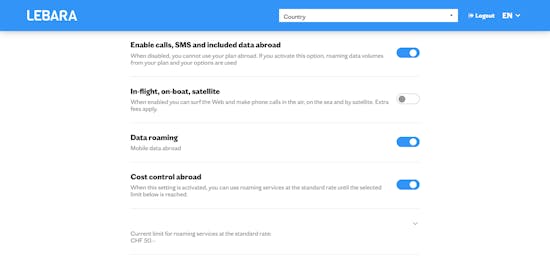

One place to manage your roaming — free and available worldwide
Roaming tips
#1 Cost control
You will find the Cost Control option all the way at the bottom of the Roaming Cockpit. Make sure that you set your cost limit to at least CHF 50, else you will not be able to roam during your holidays. Unless you have roaming included in your mobile plan or an active option available. Just select your preferred maximum amount and enjoy worry-free roaming while keeping your expenses under control. By activating the airplane mode you will have the guarantee to not roam at all.
#2 Optimize with Apps
Unlock the full potential of your smartphone by downloading apps that bring your favorite online services offline. From news portals and timetables to travel info and restaurant guides, access crucial information without the need for constant internet connectivity.
Prepare for your vacation by downloading these apps in advance, ensuring you're equipped to search for everything you need.
#3 Unlock Offline Features
Maximize your vacation experience by leveraging offline functionalities:
Google Maps Offline: Download maps for your desired regions in advance with Google Maps. Navigate seamlessly in offline mode, ensuring you always find your way, sans data usage.
Offline Music with Spotify & Apple Music: Create the perfect vacation soundtrack by utilizing offline modes on Spotify and Apple Music. Select your favorite playlists, download them to your smartphone, and enjoy music without tapping into your data.
Whether you're exploring new places or just relaxing, let the music play offline.
#4 Disable Automatic Updates
Save your data for what matters. Many are unaware that apps can silently update in the background, consuming significant data. Take control with these simple steps:
Apple: Go to Settings > Automatic Downloads and switch off the apps.
Android: In the Play Store App, select Settings > Allow automatic app updates only via WLAN.
Ensure your apps update only when you're connected to WLAN, preserving your data for the things you truly care about.
#5 Disable push download of e-mails
Stay in control of your data usage while on vacation. Follow these steps to manage email downloads:
Avoid Automatic Downloads: When on holiday, a quick email check can consume more data than you think. Disable push download for emails to prevent automatic data usage, especially for those short messages or junk mail.
Download Manually: Choose when to download messages manually, ensuring you're connected to WLAN for larger attachments.
By adjusting your email settings, you preserve data for essential tasks and enjoy a more mindful use of your mobile data.
#6 Data Package
Experience seamless connectivity with Lebara's customizable data packages. Stay in the know with the ability to check your roaming option status anytime, free of charge, via SMS. This ensures you're always in control of your mobile data expenses, allowing you to save money while staying connected on the go. Enjoy the freedom of full cost control with Lebara.
#7 Airplane Mode
Take charge of your connectivity and costs while enjoying your journey:
Peaceful Breaks: Activate Airplane Mode to pause calls and data connections, ensuring zero unexpected charges.
Entertainment Uninterrupted: Despite being unreachable, you can still listen to music, play games, and capture moments with photos and videos.
Smart Cost Management: Switch off data roaming to receive calls without incurring data costs.
For a worry-free break, simply toggle on Airplane Mode and enjoy the benefits of being in control of your accessibility, battery, and mobile expenses.
#8 Voicemail
Protect your wallet by understanding the cost implications:
Triple Charges: Calls forwarded to your voicemail incur threefold expenses – listening to voicemail, international connection charges, and call forwarding fees.
Expensive Abroad: Voicemail services can be particularly costly when used abroad due to the combination of charges.
Financial Wisdom: To avoid unnecessary expenses, it's recommended to turn off your voicemail before heading on vacation.
Save on your communication costs by taking a simple step – switch off voicemail and enjoy your vacation without worrying about unexpected charges.
#9 Surf with WLAN
Make the most of your internet experience while on vacation:
Cost-Effective Surfing: Save on data costs by leveraging the free or affordable Internet access provided by many hotels.
Connect with Ease: Use the hotel's WLAN for casual social network browsing and exploring tourist attractions without worrying about data charges.
Security First: Ideally, choose secure, encrypted connections for added protection while using hotel WLAN.
Enjoy the convenience of hotel WLAN for your online activities, ensuring a budget-friendly and secure internet experience during your vacation.
FAQ
What is roaming?
Roaming is a service that allows you to use your mobile phone while outside your home network's coverage area. It enables you to make and receive calls, send text messages, and use data services in different locations.
How do I activate roaming on my phone?
To activate roaming on your phone, go to your device's settings, locate the "Network" or "Connections" section, and enable the "Roaming" option.
Can I use my current plan while roaming, or do I need to purchase a separate package?
Some mobile plans include limited or specific roaming allowances, while others may require the purchase of a separate roaming package. It's important to review your existing mobile plan. Easily do this in my Lebara.
How do I monitor my data usage while roaming?
You can monitor your data usage while roaming by checking your phone's data usage settings or using the roaming cockpit or the Lebara App. We also offer SMS notifications to help you track your data usage in real-time. Be aware of any data limits to avoid unexpected charges.